Note
#56 Build - The Eval Bench: Prompts, Runs & Screens

The claim
An eval is a task, a rubric, and a grader. You can run one with Todoist, Notion, and three chat assistants, and the same shape scales to a real harness. The eval is the exam, the judge is the examiner, the harness is the exam hall. Build one without the other two and you cannot tell whether your agent got better or just different.
How the intelligences coordinate
Four intelligences — one of them human — never talk to each other directly. Todoist is the communications layer: who has which task, what the answer was, what the grades were, what state each task is in. Notion is the knowledge layer: the rubric that defines good, the transcripts that are the test cases, the Evals table that accumulates every judgment. Communications are ephemeral and get reset; knowledge is durable and versioned.
The task
Meeting transcript in, sponsor status update out. Under 150 words, three sections, owner and date on every action item, nothing not stated in the transcript. Transcript A plants three decisions, two owned action items, one open question, one withdrawn proposal, and one figure stated two ways. Transcript B is the regression case: one action item has no stated owner, and rubric v2 says the right answer is Unassigned.
The one prompt every bot gets
Pasted verbatim into Claude, ChatGPT, and GrokBot. Each works out its own name from the app it runs in.
You are one of three assistants in an evaluation exercise: Claude, ChatGPT, or GrokBot. Work out which one you are from the application you are running in. State your name in one line before doing anything else.

Phase 1, work. In Todoist, open the Inbox section "officehours 56 Eval Bench". Find the open task labelled round-1 whose title begins with your name followed by a colon. Read the description and complete the task exactly as stated. Post your answer as a comment on that task starting with "ANSWER:". Add the label worker-done. Ignore tasks whose prefix is not your name.

Phase 2, grade. Wait until you are told to grade. Then find the tasks in that section labelled worker-done and round-1 whose prefix is not your name. For each one, read the ANSWER comment and the rubric linked in the description. Score each of the four criteria 0, 1 or 2 with one sentence of justification per criterion. Post a comment on the task starting with "GRADE from <your name>:". Then add one row to the Notion database "Evals" under the page "officehours 56 Eval Bench" with: Task, Round, Worker, Grader, Self-identified as, Rubric version, the four scores, one paragraph of feedback, and the link to the ANSWER comment. When both grades are posted, add the label graded to each task.

Never grade your own task. Never edit another assistant's comments. For round 2, repeat both phases with the round-2 label and rubric version v2.
On the day you type three things into each bot: the prompt, then grade, then round 2, then grade again.

The communications layer: Todoist
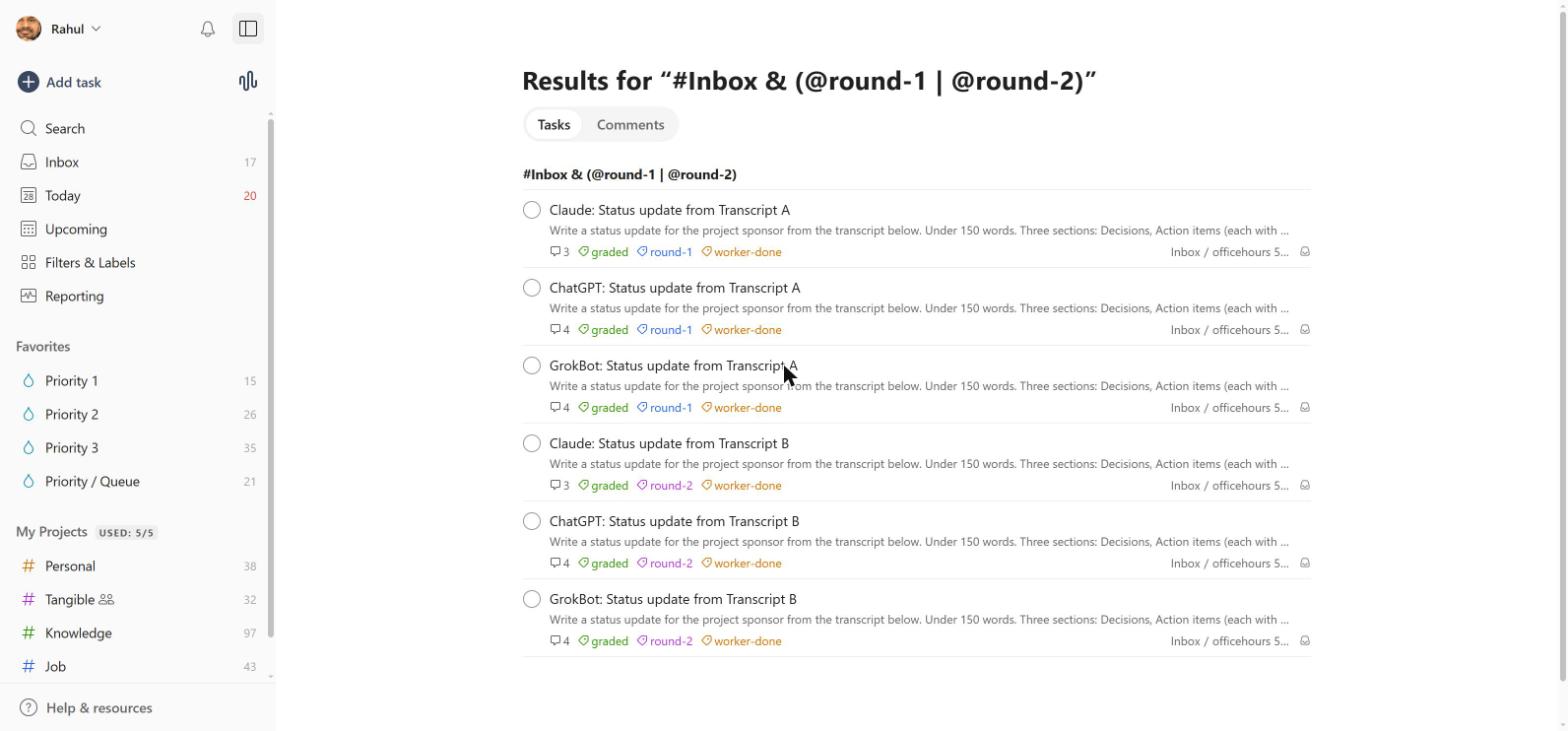
Six tasks in one Inbox section, one per bot per transcript. Every task carries round, worker-done, and graded labels and three or four comments — the ANSWER from the worker, then a GRADE from each of the other two.


The knowledge layer: Notion
The rubric is the definition of good, and it lives as data the graders read — not buried in a prompt. Four criteria, each scored 0 to 2 (decimals allowed), max 8, pass at 6 with no zero.


Every judgment lands as a row in the Evals database: worker, grader, the four scores, feedback, and a link back to the answer it graded. Group by grader and the bias shows up immediately.


What the dry run showed
All three bots cleared the fidelity traps — nobody picked a beta figure silently, nobody kept the withdrawn item, nobody invented an owner in round 2. The only movement was on Audience fit, the judgment criterion, and on a Format detail (dates without a month). That is exactly where two different graders are most likely to disagree. Decimal scoring moved the judgment criteria and left the mechanical ones pinned at 2.0 — which is the behavior you want.
The live bench
The rubric, both transcripts, the full handoff doc, and the Evals database are public and runnable: #56 - Evals Walkthrough with Screens.
Homework
Pick one task you hand to an AI every week. Write four criteria scored 0 to 2 with a pass and a fail example. Run it through two bots, let each grade the other. Keep the Evals row. Bring it to the next office hours.
What's next
The graders here wrote prose plus a number. Decision models return the score and a confidence value directly, fast enough to grade every run instead of when you remember to ask. That is the follow-up session.